How clearer, time-specific pickup instructions can help you drive delivery dfficiency
November 2025
Between finding a place to park, locating the right entrance and pickup area at a restaurant, and managing customers' expectations, even a single order can be confusing and time-consuming for couriers. Many of them end up cancelling orders because they don't have enough information for accurate pickup instructions, but they're still accountable to timeliness. Updated notes during peak or late-night hours are even more critical if operations are different.
To help reduce courier confusion during pickup, we’re introducing a new enhancement that allows you to communicate clearly with them. You can now add scheduled courier pickup instructions that automatically adjust throughout the day.
Check it out here.
Why accurate pickup instructions matter
Clearer, time-specific pickup instructions help couriers find your store easily, complete handovers faster, and keep your operations running smoothly. Together, these updates can help reduce cancellations, improve reliability, and create a better experience for couriers, customers, and your team.
For example, if couriers should use a different entrance or a pickup window during weekend lunch rushes, it’s important to let them know where to go to pick up orders, especially if these pickup instructions are different from non-peak hour instructions or if restaurant signage instructs them differently.
1. Boost operational efficiency
Generic instructions often cause confusion - especially during late-night hours when store access changes. With Scheduled Pick-Up Instructions, you can share the right details at the right time. This may lead to:
Fewer cancellations: Couriers will know exactly where to go, even during restricted access periods (like 8 PM–6 AM).
More reliable operations: Time-specific guidance helps reduce mix-ups and improve order completion rates.
Happier customers: Accurate courier instructions can reduce delays and help create a smoother delivery experience.
2. Make pickups easier for couriers
Couriers need quick, relevant, and understandable guidance. These updates address two major pain points - irrelevant instructions and language barriers.
Contextual clarity: Couriers only see instructions that apply to their pickup time (e.g., “Use drive-thru only after 11 PM”).
Automatic translations: Instructions automatically translate into the courier’s device language, reducing confusion and making handovers faster.
3. Deliver a better customer experience
When pickups are efficient and cancellations drop, customers receive their food faster, fresher, and more reliably—driving satisfaction and repeat orders for your business.
How to update your pickup instructions
You can manage your instructions anytime through Uber Eats Manager (UEM) or Uber Eats Orders (UEO). For integrated merchants, changes can also be made via your API setup. Here’s what you need to do:
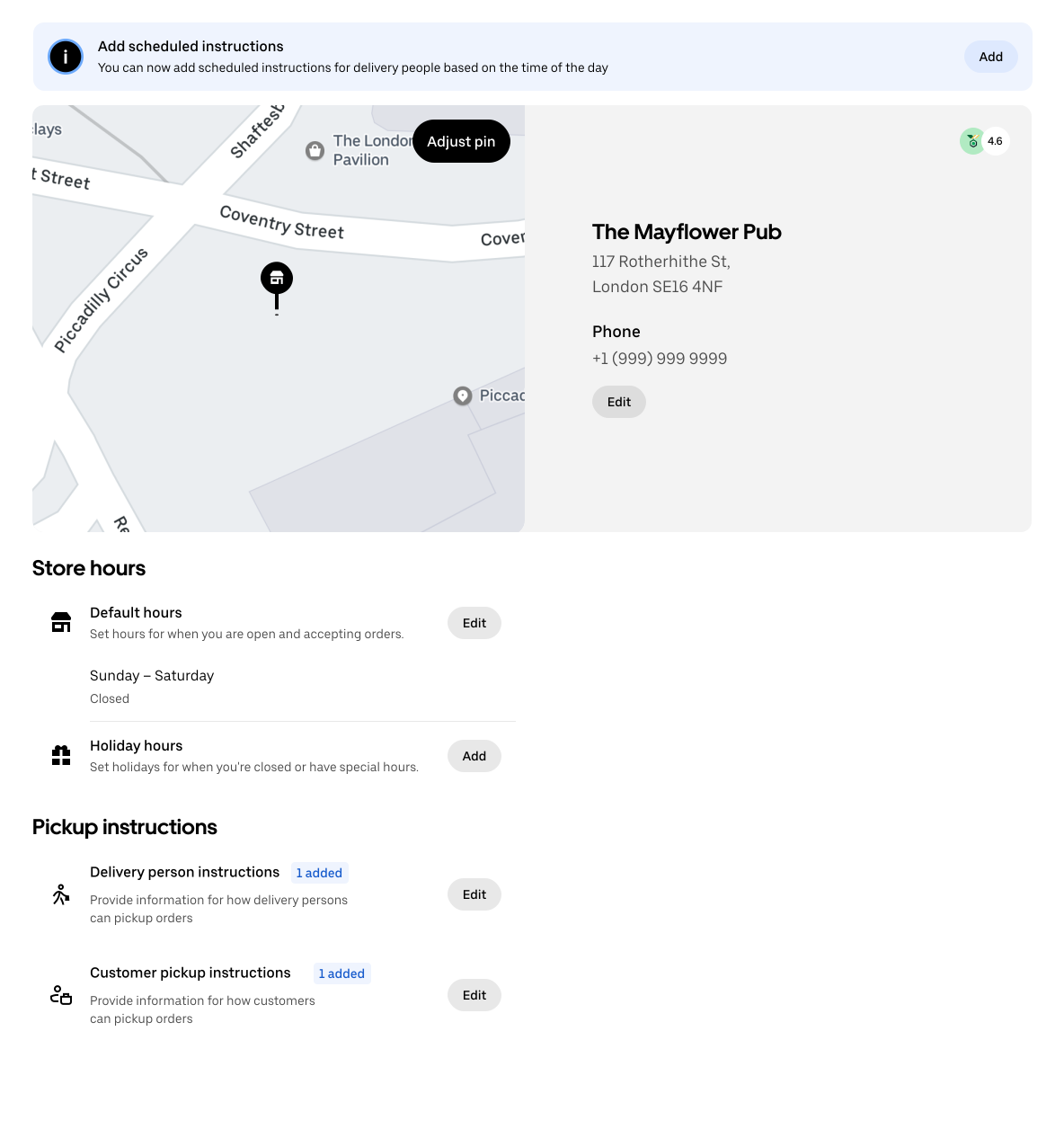
1. Navigate to delivery instructions:
In UEM, navigate to Store Info → Store hours → Pick-Up Instructions → Edit.
2. Set separate instructions for couriers and customers:
You’ll now see two fields - one for Delivery partner instructions and another for Customer pickup instructions. Select Delivery partner instructions.
3. Add your default instructions:
These instructions will be shown to couriers by default, but will be overridden by scheduled instructions during the hours you select in the following step.
- Choose your main pickup method (e.g., Walk-in, Drive-thru, Curbside).
- Add clear, specific notes (e.g., “Enter through the front door and look for delivery signage.”).
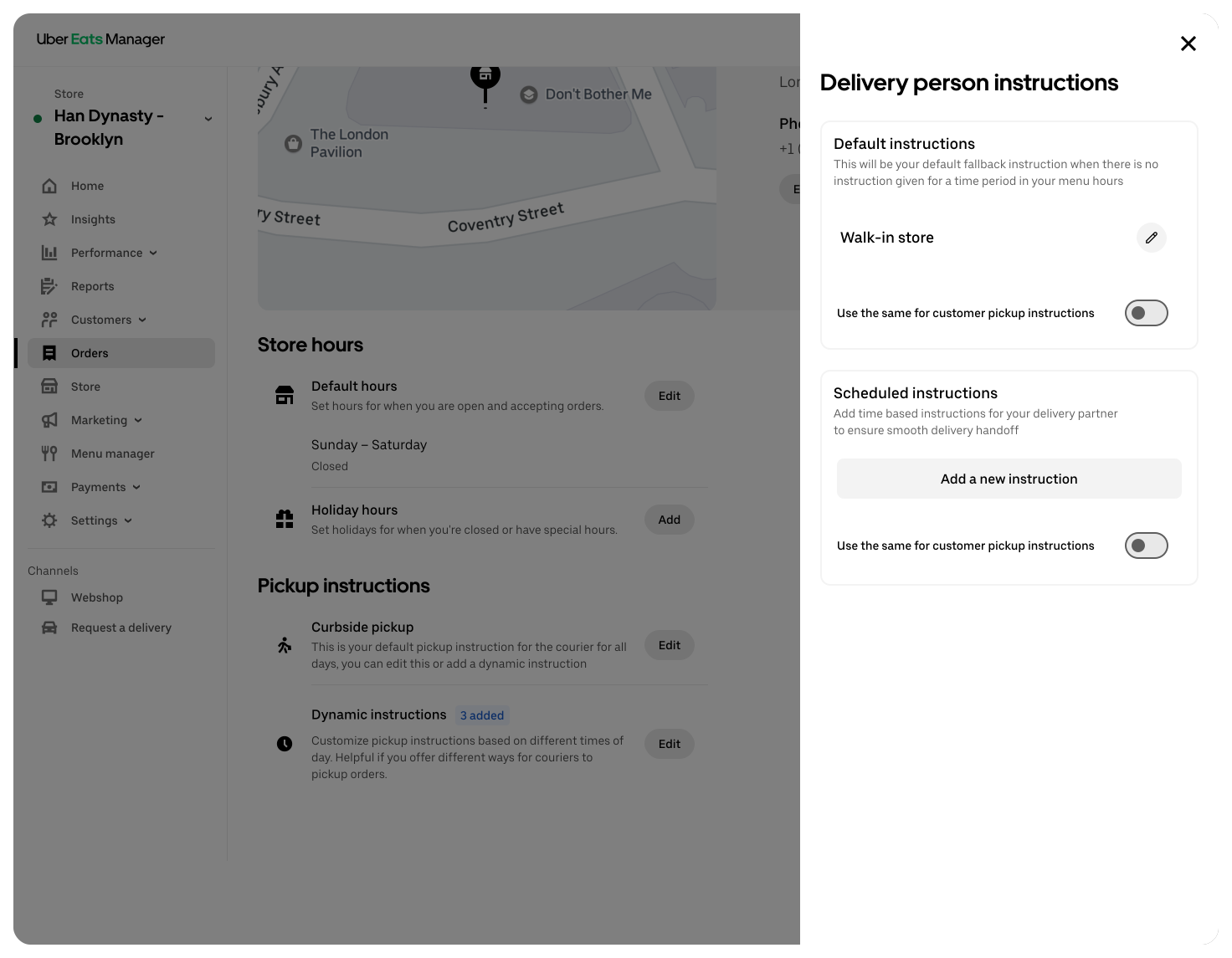
4. Add scheduled instructions (for specific time windows):
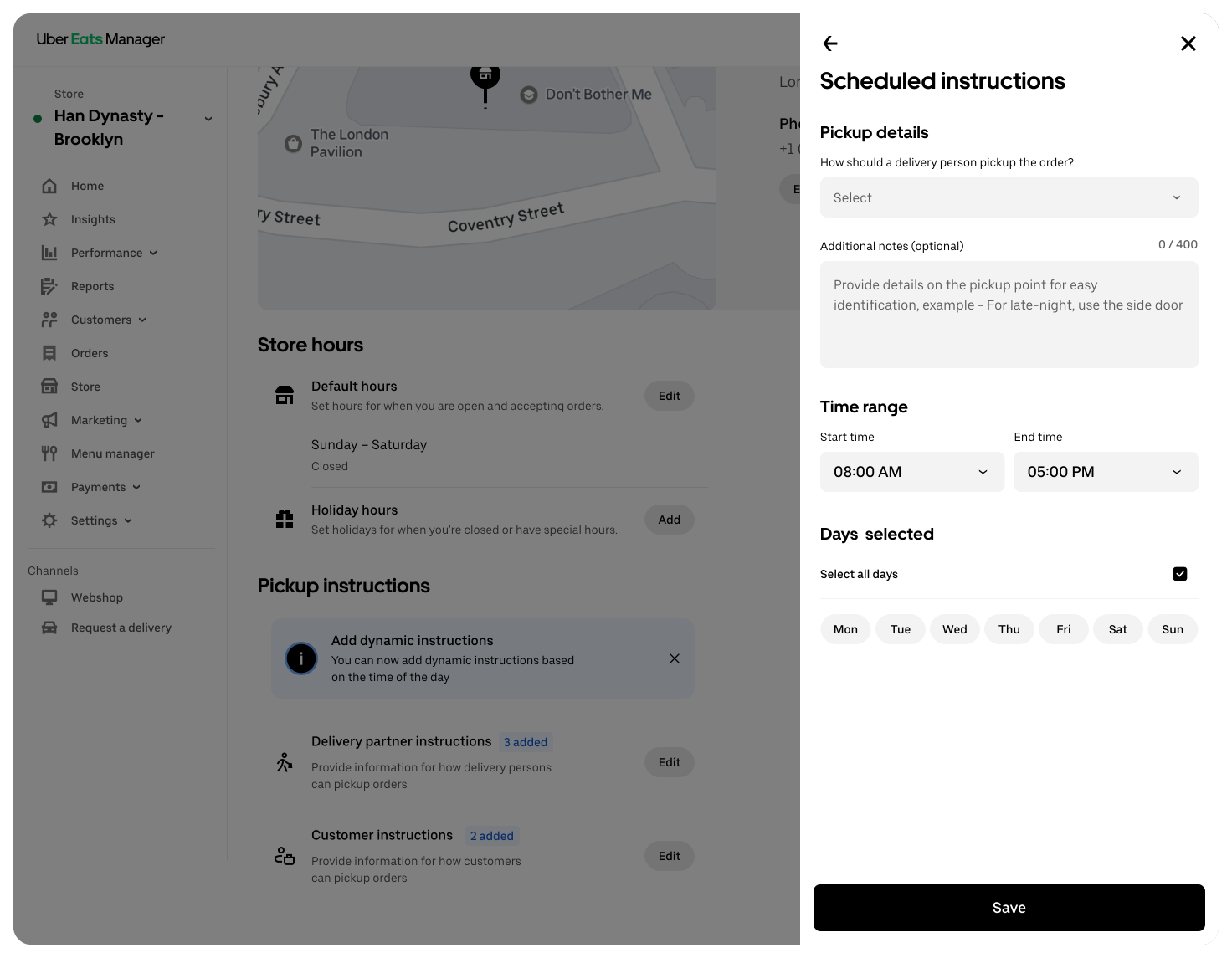
Scroll to Scheduled Instructions and select Add. Define the time and days (e.g., 9:00 PM-2:00 AM, Monday-Friday).
Add instructions for that period (e.g., “After 9 PM, the lobby is locked; please use the side door with code 1234.”).
Scheduled instructions will automatically override your default ones during those times. Tip: The system won’t allow overlapping or conflicting rules, so your instructions will always stay clear and consistent.
Next steps
We encourage all merchants to review and update their pickup instructions to make the most of these new features. Clearer guidance can help couriers find you faster, reduce cancellations, and create a smoother delivery experience for everyone.
You can get started anytime in Uber Eats Manager → Store Info → PickUp Instructions. To learn more about how to make sure your courier handoff process is smooth, check out our seamless delivery handoff tips.
Solutions
Business types
Business types
Resources
Resources